Welcome to the Lidcombe College TAFE Library blog, keeping you informed of news and changes within the library.

Wednesday, October 16, 2013

My Lists (permanent bibliography list) – from the TAFE Library Catalogue

If you want to save your search results and make them into your reading list, there are 2 types of bibliographic lists for you to choose from – temporary list (Temp List) and permanent list (My Lists).  Both of them can be viewed, printed and e-mailed.
  • The “Temp List is retained only for the length of the current session, and only one list can be maintained in the session.  It will be removed when you close your session.
  • The “My Lists” is retained in your account as long as you want, and you can create any number of lists for your study. 

If you want to create a permanent list, or to access your existing permanent lists, please refer to the following steps:-
  • log into your account with your TAFECard barcode number and PIN no. (please check your PIN no. at the Library Information counter), you will find “My Lists” on the menu bar.

  
  • Click on “My Lists” from the menu bar.  On the My Lists screen, you can:-
  • Create new list
  • Delete list
  • Rename list name
  • Change / activate any list
  • Edit list contents
  • View, email, and print the list.  There is a different level of detail to display for each record on the list.


Friday, October 11, 2013

Welcome Back!

Welcome back to Term 4.

Our Opening Hours are now Term Time hours again. Every Wednesday, the Lidcombe Library opening hours will begin at 8:30 a.m. These extended hours will be continued on trial during Term 4. So, make the most of this opportunity and come to the Library before your class.

Lidcombe:
Mon - Tue   9:00 a.m. ~ 8:00 p.m.
Wed           8:30 a.m. ~ 8:00 p.m.
Thur           9:00 a.m. ~ 7:00 p.m.
Fri              9:00 a.m. ~ 4:30 p.m.

Chullora:
Mon - Wed  9:30 a.m. ~ 7:30 p.m.
Thur          10:00 a.m. ~ 1:00 p.m. ; 2:00 p.m. ~ 6:00 p.m.
Fri              9:30 a.m. ~ 1:00 p.m. ; 1:30 p.m. ~ 4:00 p.m.

Hope to see you all soon.
We look forward to helping you with all your information needs this Term.


Regards from,
The Lidcombe Library Team

Thursday, September 19, 2013

Sep-Oct vacation opening hours at LID and CHU Libraries


Guessing Competition Winner

Congratulations !

Greg O’Neil,

Head Teacher of Carpentry and Joinery Section
at
Chullora campus,

you have won the prize!


There were 87 lollies and Greg guessed 82. 

Wednesday, September 11, 2013

Congratulations!!! Award Winner

Congratulations 
to
Alexander Dagger

who won his
NSW Training Award

for
School Based Apprentice/Trainee of the Year


Alexander studied Certificate IV in Telecommunications at Lidcombe College.

Monday, September 09, 2013

Bibliography List -- TAFE Library Catalogue

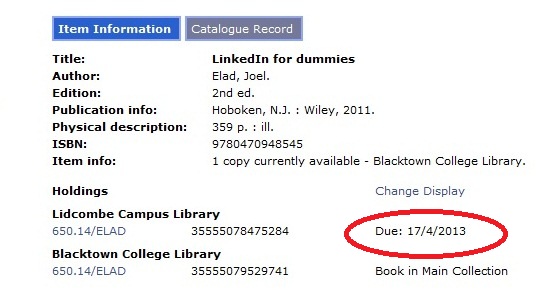
On the Item details screen (see September 03, 2013 blog post), if you want to find:- 
  • Other titles by the same author, 
  • Other edition of the same title, or 
  • Other titles for the same subject.

There are two ways to do this:- 
  • Click on “New Search” from the menu bar to go back to the Quick Search screen, and then change the Search option to Author, Titles, or Subject. 
  • Or, click on the Catalogue Record (A) to change the display format.


On the Catalogue Record screen, besides the title, author, publication, and pagination information, it also displays the subject term and added author (the co-author).  Click on the links (A) to retrieve other titles.  


Once the item is displayed on the Search Result list or Item Details screen, you are able to keep the item as part of your reading list (bibliography list) for your study.  Tick on the Temp List box (B) to add item to the list.  The Temp List can be printed or e-mailed to yourself or someone else, but when you close your session the list will be removed.  

Tuesday, September 03, 2013

Search Result List – TAFE Library Catalogue

When you use TAFECat (the library catalogue) to search, if the search term is available, a Search Result List is displayed.


The Search Result List contains information which includes:-
  • Total titles of the search  (A)
  • The title’s bibliographic details (title, author, publisher, publication year, pagination) (B)
  • Type of material (C)
  • Library holds the copy (D)
  • If your library owns a copy, a tick will be displayed (E)
When you click on the title link, it will take you to the Item Details screen, where you can access the following information. 


  • Call number (i.e. the location on the shelf) in each library (F)
  • Status in each library (G)
If you want to use this item, go to the shelf and match the call number.

Wednesday, August 28, 2013

Competition Winner

Guessing Competition
**********************************************************

Congratulations !

Marc O'Driscoll,

Telecommunication Network Engineering student,

you have won the prize!


There were 104 lollies and Marc guessed 103. 


The second competition will start this Wednesday (28-Aug-2013) – all staff and students can enter. Open until Friday (13-Sept-2013).

Monday, August 26, 2013

Quick Search – TAFE Library Catalogue

The TAFECat is not just a catalogue, you can do a lot of thing through it.  In TAFECat, you can access all types of information that your library has for you.

Input your search terms.   By default, the search option is set to “words or phrase” (A), which search all fields.  If you want to narrow your search into a particular field, such as title, author, or subject, click on the arrow, choose the field you want to look in, then click the "Search" button (B).  No matter what index you used, the search pattern is by keyword.  Search Results List will be displayed immediately.


If you prefer a browse list for your search result, click on “Browse search” (C).  Once the browse list displays, click any item to see the search results for that item.


Tuesday, August 20, 2013

Did you know? -- How to access the Student Wireless Network

If you want to connect your iPhone, iPad, or laptop to the campus' student wireless network, please refer to the following instructions.  Also, you can find the printed copy in your Library as well.


Monday, August 12, 2013

It's Back

Our Guessing Competition is back! It is occurring in the Library at Lidcombe over the next few weeks. You are encouraged to enter, come to guess the number of lollies in the box.


Monday, August 05, 2013

Did you know? -- Where to find your Username and Password

If you want to perform the following tasks, you need to use your TAFE username and password.

  • access internet
  • check your examination result
  • access Moodle course
  • connect your laptop / smartphone to the Wi-Fi
  • set up your device's Wi-Fi connection
  • search Library databases
  • access the Library eBook collection

Your user name and temporary password is printed on the bottom of your TAFE enrolment receipt.


If you have lost your username or password, you need to go to the Admin. Customer Service Centre to reset your temporary password. The Service Centre is in:-
  • Ground floor, Building A (Lidcombe)
  • Ground floor, Building B (Chullora)

    Monday, July 29, 2013

    Did you know? -- How to use the scanners in the Library

    The Libraries use our photocopiers as scanners. You can scan your photo, picture, or document in Colour or Black&White, and the image file will be sent to any e-mail account which you assign. It’s easy to use the scanner, as follows:-

    • press [All Services] button
    • select [E-mail] icon
    • select [Keyboard] to enter your e-mail address
    • choose the Scanning Color for your image file
    • choose the image File Format
    • select the Subject box to enter the subject of the e-mail
    • select the Message box to enter any reminder notes
    • press [Start] button to start the scanning
    • logon into your email account to receive the image file


    Monday, July 15, 2013

    Welcome Back!

    Welcome back to Term 3.

    Our Opening Hours are now Term Time hours again. Every Wednesday, the Lidcombe Library opening hours will begin at 8:30 a.m. These extended hours will be continued on trial during Term 3. So, make the most of this opportunity and come to the Library before your class.

    Lidcombe:
    Mon - Tue   9:00 a.m. ~ 8:00 p.m.
    Wed           8:30 a.m. ~ 8:00 p.m.
    Thur           9:00 a.m. ~ 7:00 p.m.
    Fri              9:00 a.m. ~ 4:30 p.m.

    Chullora:
    Mon - Wed  9:30 a.m. ~ 7:30 p.m.
    Thur          10:00 a.m. ~ 1:00 p.m. ; 2:00 p.m. ~ 6:00 p.m.
    Fri              9:30 a.m. ~ 1:00 p.m. ; 1:30 p.m. ~ 4:00 p.m.

    Hope to see you all soon.
    We look forward to helping you with all your information needs this Term.


    Regards from,
    The Lidcombe Library Team

    Wednesday, June 12, 2013

    Institute Achievement Awards

    Congratulations to following students who won their sections Institute Achievement Awards presented at a function on 6th June 2013.

    Monday, June 03, 2013

    New Equipment -- Portable DVD Player

    Did you know your Library has a large amount of resources in CD-ROM, DVD, and on-line format?  There are 3 portable DVD players available for you to use inside Lidcombe Library now.   Come in now and ask Library staff for more details.

    Monday, May 27, 2013

    Morning Tea at the Library for Library & Information Week 2013

    Our Library & Information Week Morning Tea was a great success.


    We also drew the prizes for the entries for Share Your Story – the 2013 Library & Information Week theme :-


    Muzeyyen Kopuz (ESOL/ABE)

    Ana Maria Zavala Sepulveda (ESOL/ABE)

    Rajoun Zouein (ESOL/ABE)

    Van Dung Nguyen (ESOL/ABE) – 774500th visitor to Lidcombe Library

    Gabriel Stevill (Electrotechnology) – 315000th visitor to Chullora Library


    Monday, May 13, 2013

    Did you know? -- How to put money on your TAFECard

    If you want to use your TAFECard to pay for computer printing, and photocopying in the Library, or parking fees, you need to use the Autoloader to add value into your TAFECard account before you operate the machines.


    It's easy to use the Autoloader, as follows:-
    1. swipe your TAFECard
    2. insert coins / notes (no change given, but money remains on your card)
    3. press Finish button to close your account

    Monday, May 06, 2013

    Did you know? -- How to print your file in the Library

    Our Libraries use our photocopiers as computer printers. You can print in Black & White or in Colour. The charges are the same as for photocopying.


    Monday, April 29, 2013

    Did you know -- Trial of Extended Library Hours

    From 1-May-2013, every Wednesday, the Lidcombe Library opening hours will begin at 8:30 a.m.  These extended hours will be on trial during Term 2.  So,  make the most of this opportunity and come to the Library before your class.


    Tuesday, April 09, 2013

    Congratulations !!! Award Winners.

    Congratulations to Justin Hoffman and Glen Kitchen who won their sections SWSi 2012 sponsored prizes.


    Monday, April 08, 2013

    Did you know? -- if the item belongs to another library – how to borrow it.

    If an item belongs to another TAFE library, you have 2 ways to borrow the item. 


    • your TAFECard can be used at any NSW TAFE library, you may just go to that library to borrow the item.
    • contact your own Library in person to arrange an Inter-Library Loan.  You will need to fill in the request form.

    Tuesday, April 02, 2013

    Did you know? – if the item is on loan -- how to place a Hold

    If items are currently on loan, you have 2 ways to Hold / Reserve items that have been borrowed. 


    • contact the Library in person
    • contact the Library by phone
      • 9643 4540 (Lidcombe)
      • 9742 0430 (Chullora)

    When an item is Held / Reserved, it must be returned to the Library by the due date by the current borrower.  Renewal won't be possible.

    Tuesday, March 26, 2013

    Did you know? -- The TAFE Library Catalogue

    • contains details of holdings for all TAFE NSW libraries
    • can be searched from anywhere on the internet (http://tafecat.tafensw.edu.au/tafecat.html)
    • shows you what is on loan and what is available on the shelves
    • allows you to create a list of the titles relevant to your studies
    • allows you to copy, edit, paste and save the list of titles
    • allows you to email search results to your own personal accounts
    • allows you to see your borrower record and item due dates through MyAccount
    • pick up a brochure at the Library for further details


    Monday, March 11, 2013

    Did you know? -- What happens when a loaned item is overdue.

  • privileges stopped for all library services
  • if you contact us within 3 days, we may be able to arrange a renewal
  • if items are not returned after 1 week a reminder notice will be posted to you
  • if items are not returned after 2 weeks a final notice will be posted to you
  • if items are not returned after 3 weeks a Breach of Discipline notice will be posted to you
  • at this stage a $10 fee applies to each overdue item
  • and your results / transcripts are withheld until all fees are settled
  • pick up a brochure at the Library for further details

  • Monday, March 04, 2013

    Did you know? - renewing library loans

    You have many ways to renew your loaned items:-

    • contact the Library in person
    • contact the Library by phone
      • 9643 4540 (Lidcombe)
      • 9742 0430 (Chullora)

    • renew online via the TAFE Catalogue
      • please contact the Library for your Library Account PIN number
                (if the items are overdue or reserved, you may not be able to renew them)

    Monday, February 25, 2013

    Did you know?

    • you may borrow 15 items in any format


    •  
    • most items maybe renewed twice
      • providing the items are not overdue
      • providing the items have not been reserved

    • most loans and renewals are for 2 weeks
    • please return or renew item / items on or before the due date

    Tuesday, February 19, 2013

    Did you know?

    If you are a new student, and have not used our Libraries yet, here's some great news:-
    • your TAFECard is also your Library card to use at all TAFE Libraries
    • your TAFECard can also operate the Library's photocopiers, printers, and campus boomgates
    • please notify the Library of the TAFECard's loss, any change of your address, telephone number, or other personal details as soon as possible.

    Tuesday, February 12, 2013

    Welcome Back!

    Welcome back to Term 1.

    Our Opening Hours are now Term Time hours again.

    Lidcombe:
    Mon - Wed  9:00 a.m. ~ 8:00 p.m.
    Thur            9:00 a.m. ~ 7:00 p.m.
    Fri              9:00 a.m. ~ 4:30 p.m.

    Chullora:
    Mon - Wed  9:30 a.m. ~ 7:30 p.m.
    Thur          10:00 a.m. ~ 1:00 p.m. ; 2:00 p.m. ~ 6:00 p.m.
    Fri              9:30 a.m. ~ 1:00 p.m. ; 1:30 p.m. ~ 4:00 p.m.

    Hope to see you all soon.
    We look forward to helping you with all your information needs this Term.

    Regards from,
    The Lidcombe Library Team

    Monday, December 03, 2012

    Summer 2012-2013 Vacation Library Services

    Library Services during the Summer vacation break:

    Please refer to previous blog post for Opening Hours at Lidcombe and Chullora during the Summer vacation break.

    Due dates for return of all borrowed items:

    Students - by Friday 30th November 2012.

    Staff - by Friday 7th December 2012.

    Stocktake will commence on Monday 10th December 2012.

    Blog posts will recommence in February 2013.

    Enjoy your vacation break.
    Best wishes for a Happy Christmas and New Year from the Library team.


    Monday, November 19, 2012

    ProQuest Computing

    ProQuest Computing is the premium resource for those who need access to comprehensive coverage of computer topics. The database includes around 450 titles, with over 350 available in full text.  It covers the subjects including:-
    • Computer Science
    • Information Systems
    • Computer Security
    • Database Design
    • Software Development
    • Web Commerce: LANs
    • WANs
    • Intranets
    • Internet
    To start searching the ProQuest Computing database now go to TAFE Catalogue (http://tafecat.tafensw.edu.au/tafecat.html) and search for "proquest computing" or go to SWSi Library website (www.swsi.tafensw.edu.au/library), click on  


    find it listed in the Database (List (A-Z) section.

    Monday, November 05, 2012

    ProQuest Telecommunications

    ProQuest Telecommunications is an essential resource for anyone researching the industry or its technology.  The database includes over 140 titles, with more than 115 available in full text.  Search more than 600,000 records, dating back to the early 1990's.  The database covers the subjects including:-
    • Telecommunications
    • Computer applications
    • Data communication
    • Data transmission systems
    • Electronic data processing
    • Information science
    • Information theory
    • Radio
    • Tellevision
    • Wireless communications
    To start searching the ProQuest Telecommunications database now go to TAFE Catalogue (http://tafecat.tafensw.edu.au/tafecat.html) and search for "proquest telecommunications" or go to SWSi Library website (www.swsi.tafensw.edu.au/library), click on  


    find it listed in the Database (List (A-Z) section.

    Monday, October 29, 2012

    TVNews

    TVNews is a database that lets you search and retrieve news stories and related current affairs programs from the free-to-air networks -- ABC, ABC2, SBS, TEN, 9 and 7, with links to the digitised video content. Includes detailed synopsis with broadcasts and updated daily.

    To start searching the TVNews database now go to TAFE Catalogue (http://tafecat.tafensw.edu.au/tafecat.html) and search for "TVNews" or go to SWSi Library website (www.swsi.tafensw.edu.au/library), click on


    find it listed in the Specialist databases section.

    Popular topics include current affair, political and government, business and finance, lifestyle, news and crime, sport, environment, health, science and nature, IT and technology.

    Monday, October 22, 2012

    National Construction Code Series

    The National Construction Code (NCC) provides a nationally accepted and uniform set of technical requirements for all areas of building, from design to construction.

    The NCC includes the Building Code of Australia (BCA) and Plumbing Code of Australia (PCA) and is referred to as the building regulation in all States and Territories.

    The NCC is divided into three volumes:
    • Volume 1 – Building Code of Australia (BCA) (Class 2 to 9 buildings)
    • Volume 2 – Building Code of Australia (BCA) (Class 1 and 10 buildings)
    • Volume 3 – Plumbing Code of Australia

    Your Library has subscribed for online access to full text of NCC through the NCC Online database. SWSi's staff and students have immediate access the NCC in the college or at home through the following link.

    If you don't know this year's User ID and password for the SWSi Library eResources page, please call the Library on 96434540 at Lidcombe and 97420430 at Chullora.


    Monday, October 15, 2012

    Australian Standards

    Your Library has subscribed for online access to full text of Australian Standards through the Standards Online Premium database.  SWSi's staff and students have immediate access to any of Australian Standards  in the college or at home through the following link.


    If you don't know this year's User ID and password for the SWSi Library eResources page, please call the Library on 96434540 at Lidcombe and 97420430 at Chullora.

    Monday, October 08, 2012

    Welcome Back!

    Welcome back to Term 4.

    Our Opening Hours are now Term Time hours again.

    Lidcombe:
    Mon-Wed  9am-8pm
    Thur  9am-7pm
    Fri  9am-4.30pm

    Chullora:
    Mon-Wed  9.30am-7.30pm
    Thur  10am-1pm; 2pm-6pm
    Fri  9.30am-1pm; 1.30pm-4pm

    Hope to see you all soon.
    We look forward to helping you with all your information needs this Term.

    Regards from,
    The Lidcombe Library Team

    Monday, September 10, 2012

    National Year of Reading 2012 Winners

    Congratulations to our Prize Winners!

    The prizes were movie passes, USB flash drives, printing and photocopying credits, and water bottles.


    Lidcombe Campus
    Abdur Rahim
    Jad Refaie
    Svetlana Josevska
    Les McGrath
    Stephen Clayton
    Hon Tai
    Christopher Tedi
    Chris Malkinson
    Yong Shen
    Daniel Daniel

    Chullora Campus
    Mitchell Shand
    Lakshita Seth
    Peter Kyvetos
    Mortasa Daryab
    Noge Beshere
    Daniel Brooks
    Olga Keenan
    Lance Davids
    Mauro Ditria
    Kumar Devaraju


    Monday, September 03, 2012

    Congratulations !!! Award Winners


    Lidcombe and Chullora had 6 students competing at the 2012 WorldSkills Australia National Competition last week at Sydney Showgrounds, Sydney Olympic Park and with 4 winning a medal.  They performed very well and won the following medals. Congratulations!


    Gold Medal
    Brett Cahill from Cabinetmaking
    David Corrigan from Joinery

    Silver Medal
    Nikolas Skibola from Joinery

    Bronze Medal
    Nathan Cardwell from Cabinetmaking

    Dong Xuan Nguyen from Information Technology, competing in the PC Support category, also performed honourably, and narrowly missed out on a medal, coming in at 4th place.


    The state competitors who topped their regional competitions were :
    Dong Xuan Nguyen from Information Technology
    Ronald Lawrence from Cabinetmaking


    Well done, guys !!!