- press [All Services] button
- select [E-mail] icon
- select [Keyboard] to enter your e-mail address
- choose the Scanning Color for your image file
- choose the image File Format
- select the Subject box to enter the subject of the e-mail
- select the Message box to enter any reminder notes
- press [Start] button to start the scanning
- logon into your email account to receive the image file


LIDCOMBE COLLEGE TAFE LIBRARY
Monday, July 29, 2013
Did you know? -- How to use the scanners in the Library
The Libraries use our photocopiers as scanners. You can scan your photo, picture, or document in Colour or Black&White, and the image file will be sent to any e-mail account which you assign. It’s easy to use the scanner, as follows:-


Monday, July 15, 2013
Welcome Back!
Welcome back to Term 3.
Our Opening Hours are now Term Time hours again. Every Wednesday, the Lidcombe Library opening hours will begin at 8:30 a.m. These extended hours will be continued on trial during Term 3. So, make the most of this opportunity and come to the Library before your class.
Lidcombe:
Mon - Tue 9:00 a.m. ~ 8:00 p.m.
Wed 8:30 a.m. ~ 8:00 p.m.
Thur 9:00 a.m. ~ 7:00 p.m.
Fri 9:00 a.m. ~ 4:30 p.m.
Chullora:
Mon - Wed 9:30 a.m. ~ 7:30 p.m.
Thur 10:00 a.m. ~ 1:00 p.m. ; 2:00 p.m. ~ 6:00 p.m.
Fri 9:30 a.m. ~ 1:00 p.m. ; 1:30 p.m. ~ 4:00 p.m.
Hope to see you all soon.
We look forward to helping you with all your information needs this Term.
Regards from,
The Lidcombe Library Team
Our Opening Hours are now Term Time hours again. Every Wednesday, the Lidcombe Library opening hours will begin at 8:30 a.m. These extended hours will be continued on trial during Term 3. So, make the most of this opportunity and come to the Library before your class.
Lidcombe:
Mon - Tue 9:00 a.m. ~ 8:00 p.m.
Wed 8:30 a.m. ~ 8:00 p.m.
Thur 9:00 a.m. ~ 7:00 p.m.
Fri 9:00 a.m. ~ 4:30 p.m.
Chullora:
Mon - Wed 9:30 a.m. ~ 7:30 p.m.
Thur 10:00 a.m. ~ 1:00 p.m. ; 2:00 p.m. ~ 6:00 p.m.
Fri 9:30 a.m. ~ 1:00 p.m. ; 1:30 p.m. ~ 4:00 p.m.
Hope to see you all soon.
We look forward to helping you with all your information needs this Term.
Regards from,
The Lidcombe Library Team
Tuesday, June 18, 2013

Monday, June 17, 2013


Wednesday, June 12, 2013
Institute Achievement Awards
Congratulations to following students who won their sections Institute Achievement Awards presented at a function on 6th June 2013.


Monday, June 03, 2013
New Equipment -- Portable DVD Player
Did you know your Library has a large amount of resources in CD-ROM, DVD, and on-line format? There are 3 portable DVD players available for you to use inside Lidcombe Library now. Come in now and ask Library staff for more details.


Monday, May 27, 2013
Morning Tea at the Library for Library & Information Week 2013
Our Library & Information Week Morning Tea was a great success.

We also drew the prizes for the entries for Share Your Story – the 2013 Library & Information Week theme :-

Muzeyyen Kopuz (ESOL/ABE)
Ana Maria Zavala Sepulveda (ESOL/ABE)
Rajoun Zouein (ESOL/ABE)
Van Dung Nguyen (ESOL/ABE) – 774500th visitor to Lidcombe Library
Gabriel Stevill (Electrotechnology) – 315000th visitor to Chullora Library
Monday, May 20, 2013

Monday, May 13, 2013
Did you know? -- How to put money on your TAFECard
If you want to use your TAFECard to pay for computer printing, and photocopying in the Library, or parking fees, you need to use the Autoloader to add value into your TAFECard account before you operate the machines.


It's easy to use the Autoloader, as follows:-
- swipe your TAFECard
- insert coins / notes (no change given, but money remains on your card)
- press Finish button to close your account
Monday, May 06, 2013
Did you know? -- How to print your file in the Library
Our Libraries use our photocopiers as computer printers. You can print in Black & White or in Colour. The charges are the same as for photocopying.


Monday, April 29, 2013
Did you know -- Trial of Extended Library Hours
From 1-May-2013, every Wednesday, the Lidcombe Library opening hours will begin at 8:30 a.m. These extended hours will be on trial during Term 2. So, make the most of this opportunity and come to the Library before your class.


Tuesday, April 09, 2013
Congratulations !!! Award Winners.
Congratulations to Justin Hoffman and Glen Kitchen who won their sections SWSi 2012 sponsored prizes.


Monday, April 08, 2013
Did you know? -- if the item belongs to another library – how to borrow it.
If an item belongs to another TAFE library, you have 2 ways to borrow the item.

- your TAFECard can be used at any NSW TAFE library, you may just go to that library to borrow the item.
- contact your own Library in person to arrange an Inter-Library Loan. You will need to fill in the request form.
Tuesday, April 02, 2013
Did you know? – if the item is on loan -- how to place a Hold
If items are currently on loan, you have 2 ways to Hold / Reserve items that have been borrowed.
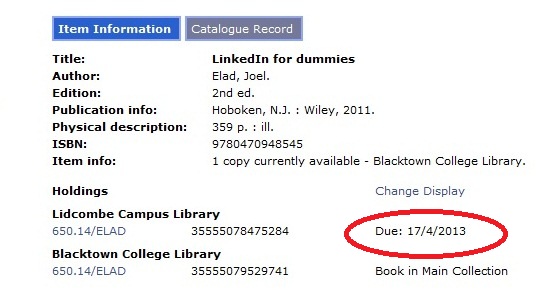
- contact the Library in person
- contact the Library by phone
- 9643 4540 (Lidcombe)
- 9742 0430 (Chullora)
When an item is Held / Reserved, it must be returned to the Library by the due date by the current borrower. Renewal won't be possible.
Tuesday, March 26, 2013
Did you know? -- The TAFE Library Catalogue
- contains details of holdings for all TAFE NSW libraries
- can be searched from anywhere on the internet (http://tafecat.tafensw.edu.au/tafecat.html)
- shows you what is on loan and what is available on the shelves
- allows you to create a list of the titles relevant to your studies
- allows you to copy, edit, paste and save the list of titles
- allows you to email search results to your own personal accounts
- allows you to see your borrower record and item due dates through MyAccount
- pick up a brochure at the Library for further details

Monday, March 11, 2013
Did you know? -- What happens when a loaned item is overdue.
Monday, March 04, 2013
Did you know? - renewing library loans
You have many ways to renew your loaned items:-

- contact the Library in person
- contact the Library by phone
- 9643 4540 (Lidcombe)
- 9742 0430 (Chullora)
- renew online via the TAFE Catalogue
- please contact the Library for your Library Account PIN number

Monday, February 25, 2013
Did you know?
- you may borrow 15 items in any format
- most items maybe renewed twice
- providing the items are not overdue
- providing the items have not been reserved
- most loans and renewals are for 2 weeks
- please return or renew item / items on or before the due date

Tuesday, February 19, 2013
Did you know?
If you are a new student, and have not used our Libraries yet, here's some great news:-

- your TAFECard is also your Library card to use at all TAFE Libraries
- your TAFECard can also operate the Library's photocopiers, printers, and campus boomgates
- please notify the Library of the TAFECard's loss, any change of your address, telephone number, or other personal details as soon as possible.

Tuesday, February 12, 2013
Welcome Back!
Welcome back to Term 1.
Our Opening Hours are now Term Time hours again.
Lidcombe:
Mon - Wed 9:00 a.m. ~ 8:00 p.m.
Thur 9:00 a.m. ~ 7:00 p.m.
Fri 9:00 a.m. ~ 4:30 p.m.
Chullora:
Mon - Wed 9:30 a.m. ~ 7:30 p.m.
Thur 10:00 a.m. ~ 1:00 p.m. ; 2:00 p.m. ~ 6:00 p.m.
Fri 9:30 a.m. ~ 1:00 p.m. ; 1:30 p.m. ~ 4:00 p.m.
Hope to see you all soon.
We look forward to helping you with all your information needs this Term.
Regards from,
The Lidcombe Library Team
Our Opening Hours are now Term Time hours again.
Lidcombe:
Mon - Wed 9:00 a.m. ~ 8:00 p.m.
Thur 9:00 a.m. ~ 7:00 p.m.
Fri 9:00 a.m. ~ 4:30 p.m.
Chullora:
Mon - Wed 9:30 a.m. ~ 7:30 p.m.
Thur 10:00 a.m. ~ 1:00 p.m. ; 2:00 p.m. ~ 6:00 p.m.
Fri 9:30 a.m. ~ 1:00 p.m. ; 1:30 p.m. ~ 4:00 p.m.
Hope to see you all soon.
We look forward to helping you with all your information needs this Term.
Regards from,
The Lidcombe Library Team
Subscribe to:
Posts (Atom)